

Prior to AspNetCore 3.0 our main way to reach http body of request and response in HttpContext was to use Body property of type Stream. It has changed, and world of .NET pipelines was introduce into http, and we got access to new BodyReader and BodyWriter (about it some other time) constructs.
About pipelines in more details you can read here.
BodyReader
It’s read side of pipe with type System.IO.Pipelines.PipeReader.
Among many interesting methods, I would like to focus at two we will use:
AdvanceTo
Method moves forward underlying pipeline cursor. We have two overloads of this method:
AdvanceTo(SequencePosition consumed)
AdvanceTo(SequencePosition consumed, SequencePosition examined)
First parameter consumed marks bytes we have finished using. The pipe can release memory before this position. Bytes after it are kept, so the next read can return an unfinished message together with new data.
Second parameter examined marks how far we have looked. Marking the buffer’s end examined lets the next read wait for more data or completion. For example in order to read whole pipe body at once we could:
static async Task<byte[]> ReadAllAsync(
    PipeReader pipeReader,
    CancellationToken cancellationToken = default)
{
    while (true)
    {
        var result = await pipeReader.ReadAsync(cancellationToken);
        var buffer = result.Buffer;
        var consumed = buffer.Start;

        try
        {
            if (result.IsCanceled)
            {
                throw new OperationCanceledException(cancellationToken);
            }

            if (result.IsCompleted)
            {
                var body = buffer.ToArray();
                consumed = buffer.End;
                return body;
            }
        }
        finally
        {
            pipeReader.AdvanceTo(consumed, buffer.End);
        }
    }
}
Above code keeps the data until the pipe completes, then copies it before releasing the buffer. Every returned read result is followed by AdvanceTo, including the one where we return. Microsoft’s pipeline examples use finally for exactly this reason.
This example buffers the whole body, so it still needs a request-size limit. The helper borrows the reader; its owner decides when to complete it.

But above solution is no much different (in result) from gathering whole data using stream. What pipes allow us to do, is to consume data piece by piece - incrementally.
Imagine situation, where we would like to parse all available messages from given stream of data. In example we will be using some ParseMessage method, that accepts ReadOnlySequence<byte> and parse it returning messages while moving buffer to trim parsed message out of it.
try
{
    while (true)
    {
        var result = await reader.ReadAsync(cancellationToken);
        var buffer = result.Buffer;

        try
        {
            if (result.IsCanceled)
            {
                throw new OperationCanceledException(cancellationToken);
            }

            while (ParseMessage(ref buffer, out Message message))
            {
                await ProcessMessage(message);
            }

            if (result.IsCompleted)
            {
                if (!buffer.IsEmpty)
                {
                    throw new InvalidDataException("Incomplete message.");
                }

                break;
            }
        }
        finally
        {
            reader.AdvanceTo(buffer.Start, buffer.End);
        }
    }
}
finally
{
    await reader.CompleteAsync();
}
After each read from pipe we are parsing and processing all messages that we found there. After no more messages in particular buffer slice we are moving forward, gathering new data to buffer. The final read can still contain data, so we process it before checking completion.
Here the loop owns the reader and completes it in the outer finally. When borrowing HttpContext.Request.BodyReader, leave its lifetime to ASP.NET Core.
Each call to ParseMessage will move buffer forward, setting consumed value at end of parsed message while examined will stay at the end of buffer allowing us to move forward with further reading.
Note
consumedandexaminedaren’t necessary same - end of message could have place earlier then end of given buffer slice that we examined.

ReadAsync
Methods reads sequence of bytes from given PipeReader. Result of this call is a type: ReadResult.
Sequence of bytes is being kept in property Buffer of type ReadOnlySequence<T>.
ReadOnlySequence is a construct for representation of memory that doesn’t exists in one piece - continuos chunk of memory like Span.
It does also contains properties IsCanceled and IsCompleted. We already used second one in previous examples to indicate whether end of data stream has been reached.
Incremental JSON
Having that we can move into clue of this post. Imagine that I need one routing property from a JSON request, and the rest of the body might be quite large. I would like to find its value without building an object containing everything else.
Something like this order, where I only need the region before choosing a handler:
{
  "requestId": "req-812",
  "propertyNameToSearchFor": "eu-west",
  "items": [
    { "sku": "book-42", "quantity": 2 }
  ]
}
The real request could have thousands of items. I only need one string, but I still need to respect the parser and pipeline contracts. Life would be too easy otherwise 😂
In this example I look for the first string-valued property named propertyNameToSearchFor, at any depth. I ignore matching names whose value is another type, but still search their children. An empty string is a match; null means I didn’t find one.
Utf8JsonReader gives us a forward-only view of JSON tokens from a span or a sequence. ValueTextEquals compares our property name, including escaped names, and I decode only the string I actually want to return. More about the reader in Microsoft’s guide.
The interesting part starts when the property and its value arrive in different reads. We need to keep two kinds of state:
read 1: {"propertyNameToSearchFor":
read 2: "eu-
read 3: west","items":[]}
After the first read, the property name is complete. After the second, its string value still isn’t. I need to keep those unfinished bytes without forgetting that I am inside an object and waiting for this property’s value.
JsonReaderStateremembers the JSON structure and reader options at our consumed position.awaitingValueremembers that I have found the property name and am waiting for its value.
Rolling back to the previous property is unnecessary. It can also lose existing JSON state if our matching property is the first token in a resumed buffer and the previous-token state starts as default.
Let’s examine the parsing method. These methods belong to the same class, with System.Buffers, System.IO.Pipelines, System.Runtime.CompilerServices, System.Text, and System.Text.Json imported:
public const string PropertyName = "propertyNameToSearchFor";
private static readonly byte[] PropertyNameBytes = Encoding.UTF8.GetBytes(PropertyName);

public static bool TryParseFromJson(
    ref ReadOnlySequence<byte> buffer,
    bool isFinalBlock,
    ref JsonReaderState readerState,
    ref bool awaitingValue,
    out string? value)
{
    var jsonReader = new Utf8JsonReader(buffer, isFinalBlock, readerState);
    value = null;

    try
    {
        while (jsonReader.Read())
        {
            if (awaitingValue)
            {
                awaitingValue = false;
                if (jsonReader.TokenType == JsonTokenType.String)
                {
                    value = jsonReader.HasValueSequence
                        ? GetSegmentedString(ref jsonReader)
                        : jsonReader.GetString();
                    return true;
                }
            }

            awaitingValue = jsonReader.TokenType == JsonTokenType.PropertyName
                && jsonReader.ValueTextEquals(PropertyNameBytes);
        }

        return false;
    }
    finally
    {
        buffer = buffer.Slice(jsonReader.Position);
        readerState = jsonReader.CurrentState;
    }
}

private static string GetSegmentedString(ref Utf8JsonReader reader)
{
    int length = checked((int)reader.ValueSequence.Length);
    byte[]? rented = null;
    Span<byte> scratch = length <= 256 ? stackalloc byte[256] : (rented = ArrayPool<byte>.Shared.Rent(length));
    try
    {
        int written = reader.CopyString(scratch);
        return Encoding.UTF8.GetString(scratch[..written]);
    }
    finally
    {
        if (rented is not null) ArrayPool<byte>.Shared.Return(rented);
    }
}
The parser consumes complete tokens and leaves an unfinished token in buffer. Its finally keeps the saved state paired with that position, including when a match is returned. If the property name was complete but its value wasn’t, awaitingValue stays set for the next call.
There is one more allocation to avoid. GetString can copy a multi-segment value into a temporary array, so for those values I use CopyString with a small stack buffer or a rented byte array. I keep GetString for contiguous values. The returned string still allocates; pooling lets me reuse the scratch buffer once the pool is warm, but its retained capacity still counts towards memory usage.
EOF is part of parsing. We pass ReadResult.IsCompleted as isFinalBlock, then let the reader process the final bytes. Even an empty final buffer matters: the saved state might still be inside an unfinished object or array. Returning null just because no bytes remain would hide that error.
Unfinished tokens
Having the state does not mean that every byte is parsed only once. JsonReaderState does not remember progress inside an unfinished token. Microsoft explicitly documents that unfinished token bytes must be supplied again.
Imagine a long string arriving a few bytes at a time. If I retry after every read, the reader can scan the same growing prefix over and over: c + 2c + 3c + ... + n, where c is the chunk size and n is the token length. That can give us quadratic scanning, even with correctly preserved reader state. The saved state helps between tokens, while this repeated work happens inside one token.
My compromise is to wait until the retained suffix approximately doubles before parsing it again. The repeated prefixes now grow geometrically. The tradeoff is that a value can become available between retries, so I might discover it later.
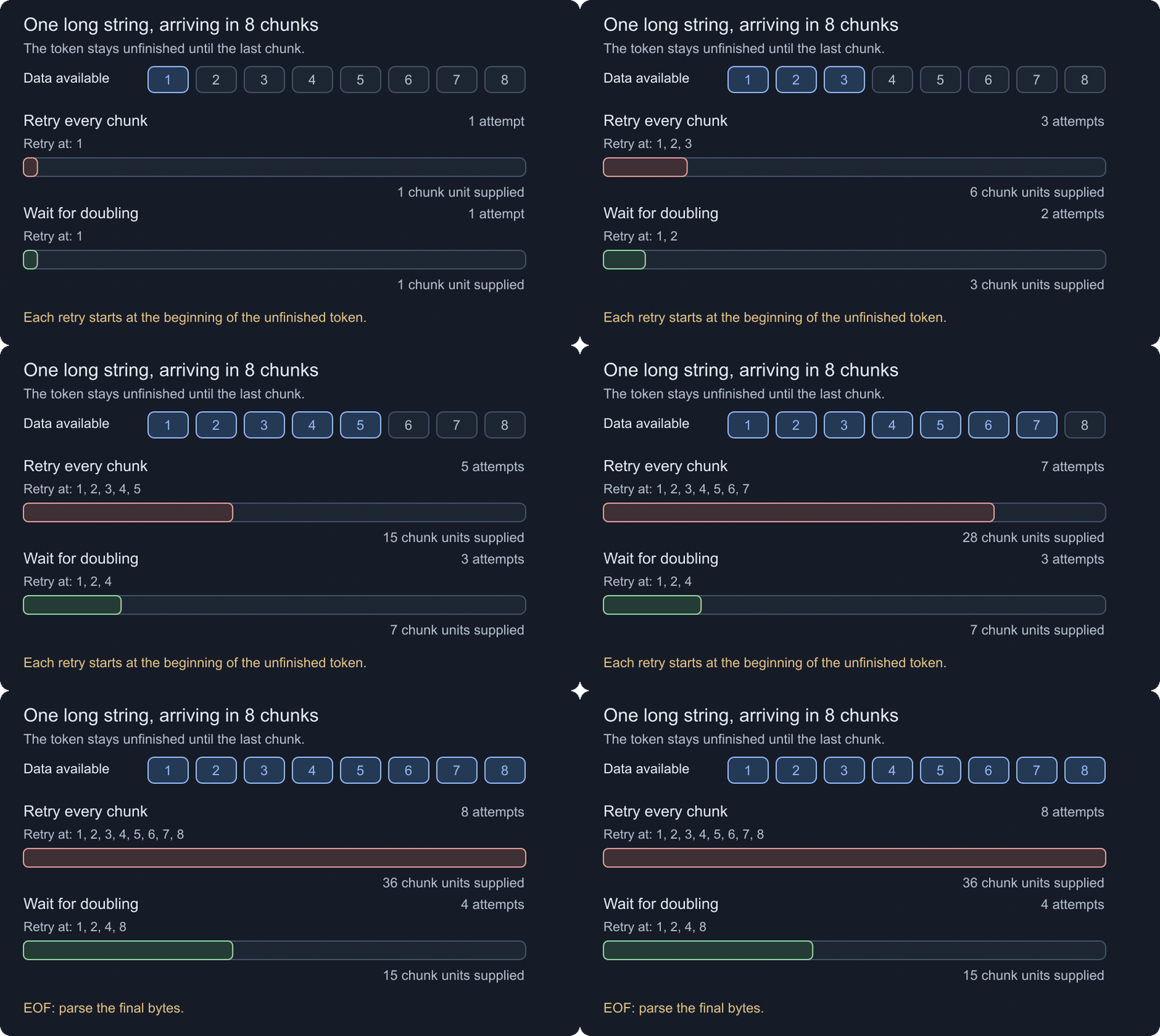
With eight equal chunks, retrying at every chunk supplies 1 + 2 + ... + 8 = 36 chunk units. Retrying at 1, 2, 4, 8 supplies 15. This is an illustration of repeated prefixes, not measured CPU work. The long string stays unfinished until the last chunk, and I still parse at EOF. A static version shows the final comparison.
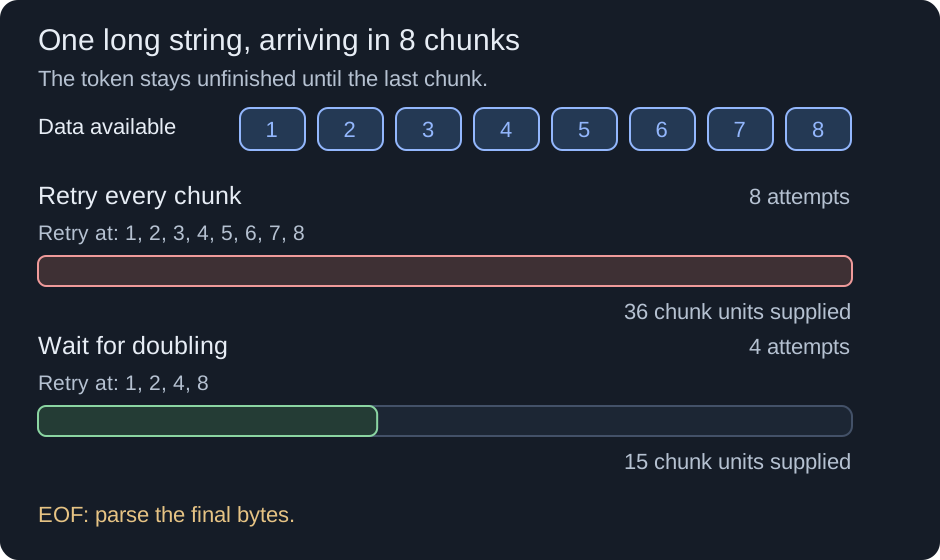
Skipping parsing alone still leaves us calling ReadAsync and AdvanceTo for every tiny chunk. I use ReadAtLeastAsync for the next threshold instead, letting the reader gather those bytes before returning control to my loop. It also returns on cancellation or completion, so I always parse at EOF, even if the buffer is shorter than the threshold.
I also limit the retained unfinished suffix. In the example below it is 256 KiB. This is checked after parsing, so it is not a strict token-size or request-size limit: one read can overshoot it, and a larger token that is already complete can be accepted. HTTP request limits still belong in our server configuration. Pipe backpressure alone doesn’t bound this retained data when I keep advancing the examined position.
Having this, our read loop becomes:
[AsyncMethodBuilder(typeof(PoolingAsyncValueTaskMethodBuilder<>))]
public static async ValueTask<string?> FindAsync(
    PipeReader pipeReader,
    CancellationToken cancellationToken = default,
    int maxPendingBytes = 256 * 1024)
{
    if (maxPendingBytes <= 0)
    {
        throw new ArgumentOutOfRangeException(nameof(maxPendingBytes));
    }

    JsonReaderState readerState = default;
    bool awaitingValue = false;
    long nextParseLength = 0;

    while (true)
    {
        var readResult = nextParseLength == 0
            ? await pipeReader.ReadAsync(cancellationToken)
            : await pipeReader.ReadAtLeastAsync((int)nextParseLength, cancellationToken);
        var buffer = readResult.Buffer;
        var consumed = buffer.Start;

        try
        {
            if (readResult.IsCanceled)
            {
                throw new OperationCanceledException(cancellationToken);
            }

            if (TryParseFromJson(ref buffer, readResult.IsCompleted,
                ref readerState, ref awaitingValue, out string? value))
            {
                consumed = buffer.Start;
                return value;
            }

            consumed = buffer.Start;

            if (buffer.Length >= maxPendingBytes)
            {
                throw new InvalidDataException("Unfinished JSON token reached the buffer limit.");
            }

            if (readResult.IsCompleted)
            {
                return null;
            }

            nextParseLength = buffer.IsEmpty
                ? 0
                : Math.Min(maxPendingBytes, buffer.Length * 2);
        }
        finally
        {
            pipeReader.AdvanceTo(consumed, buffer.End);
        }
    }
}
Each read operation that returns a result is paired with AdvanceTo, through returns, exceptions, and cancellation. ReadAtLeastAsync handles gathering intermediate data inside the reader. A canceled result is different from a read throwing before it returns: in the latter case there is no new buffer to advance.
I return ValueTask<string?> here to avoid allocating a result task when the reads complete synchronously. The pooling builder also reuses async state when a read suspends, once its cache is warm. Cold calls and concurrent requests can still allocate. Await each returned value task once; if I need a Task for WhenAll or repeated awaits, I call AsTask once and keep that task.
This helper borrows the reader and keeps examined at buffer.End. Use this early extractor for terminal request processing, or with a private reader that you complete immediately afterwards. It doesn’t provide a reusable, one-message-at-a-time cursor. Microsoft’s single-message example uses a different examined-position policy. That distinction matters for the original .NET 7 context too: moving the examined position backwards was rejected, so resetting it to the found value after earlier retries examined farther ahead is unsafe there.
Finding the value validates only the parsed prefix. For example, this extractor can return "ok" from {"propertyNameToSearchFor":"ok", broken. If I need the whole document to be valid, I keep the first match and continue parsing to EOF, or use JsonSerializer. The companion implementation includes a complete-document variant for that comparison.
Once that variant has found its value, it keeps validating tokens without searching for another match. Calling GetString for later matching properties would allocate strings I immediately discard.
Reading in middleware
What if this is only a step before the actual handler? I need to let the next component read the body again.
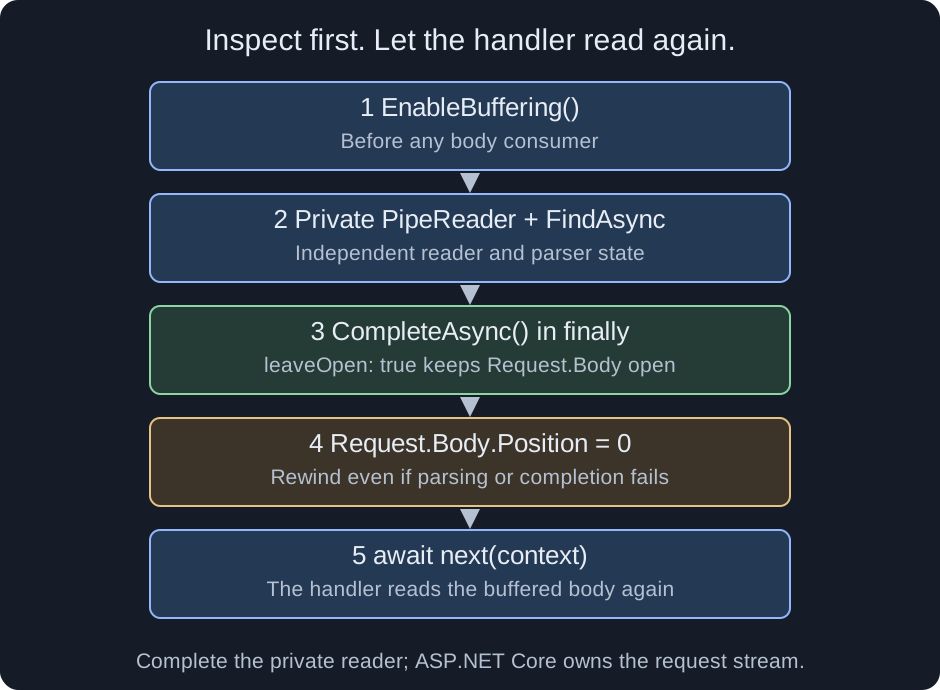
EnableBuffering makes Request.Body rewindable, but rewinding the stream does not reset a used Request.BodyReader. That reader can have its own buffered bytes or remembered EOF. ASP.NET Core caches readers by the body stream; changing the same stream’s Position doesn’t create a fresh reader.
I enable buffering before any body consumption, then create a private reader over that buffered stream. Completing it releases its state, while leaveOpen: true keeps the request stream available for the handler. Add Microsoft.AspNetCore.Http to the imports for this helper:
private static readonly StreamPipeReaderOptions RequestReaderOptions = new(leaveOpen: true);

[AsyncMethodBuilder(typeof(PoolingAsyncValueTaskMethodBuilder<>))]
public static async ValueTask<string?> InspectRequestAsync(HttpContext context)
{
    context.Request.EnableBuffering();
    var reader = PipeReader.Create(context.Request.Body, RequestReaderOptions);

    try
    {
        return await FindAsync(reader, context.RequestAborted);
    }
    finally
    {
        try
        {
            await reader.CompleteAsync();
        }
        finally
        {
            context.Request.Body.Position = 0;
        }
    }
}
I call this helper before await next(context) in middleware. The nested finally also rewinds if parsing or completion fails. ASP.NET Core owns the request stream; I complete only the reader I created.
For example, I can keep the region for routing and then let the handler deserialize the order normally:
app.Use(async (context, next) =>
{
    context.Items["region"] = await InspectRequestAsync(context);
    await next(context);
});
The reader options are immutable, so I share one options instance across requests. Each request still gets its own reader and parser state.
Middleware ordering matters. This assumes earlier components haven’t consumed the body or filled another reader’s buffers. Buffering cannot recover bytes already consumed before it was enabled. It also has a cost: data can be copied and larger bodies can spill to disk. This replay path needs its own measurements if it is the one I plan to use.
Tests and comparisons
I don’t want to call this an optimization just because it uses pipelines. The companion project compares:
- Reading the whole stream, then using
JsonSerializer.Deserialize. - Calling
JsonSerializer.DeserializeAsyncdirectly, including a small DTO baseline for an unambiguous root property. - Incremental extraction with geometric retries.
- Incremental parsing that keeps the first match but validates the whole document.
The general correctness comparisons use JsonElement to preserve the same search contract for nested and duplicate names. They compare names with NameEquals, avoiding a string allocation for every visited property name. A DTO with one root property has different semantics on those inputs, so the DTO benchmark uses a known schema with one match.
The tests exercise every byte split in the sample inputs, multi-segment tokens, escaped names and values, UTF-8 boundaries, missing and wrong-type properties, nesting, duplicates, and empty strings. They also check malformed and truncated JSON, final numbers, cancellation, advancement after exceptions, long unfinished tokens, and the retained-buffer limit. Real Kestrel tests check that an endpoint sees the whole request after middleware inspection, through both Body and BodyReader.
BenchmarkDotNet varies target position, token length, and chunk size, and records timing and allocations. Early extraction measures time to obtain the property; it can read and validate less input. The complete-document variant is the appropriate comparison when the serializer must read and validate everything. Controlled chunked streams help reproduce token boundaries, but those timings do not measure network latency or middleware buffering costs.
The benchmarks compare per-byte retries with geometric retries using the same parser. Separate allocation comparisons cover the earlier task-based implementation, pending reads, and duplicate matches during full validation.
The companion also compares decoding small and large matching strings, with escapes and multiple segments. Skipping a large padding string and returning a large matching value have different allocation costs.
What did we gain?
The companion targets .NET 9 and .NET 10. The measurements below use .NET 10.0.3, BenchmarkDotNet 0.15.8, and Apple M2. Each request has a 16 KiB padding string and a small matching value, or no match. These are short in-process measurements with three warmup and three measured iterations; the full reports include their error ranges.
| Position / chunk bytes | JsonElement async | DTO async | Incremental, full validation | Incremental, early |
|---|---|---|---|---|
| First / 64 | 4.948 µs | 3.341 µs | 5.036 µs | 0.187 µs |
| Last / 64 | 4.920 µs | 3.380 µs | 5.117 µs | 5.022 µs |
| Missing / 64 | 4.834 µs | 3.291 µs | 4.973 µs | 4.985 µs |
| Last / 4096 | 4.723 µs | 2.849 µs | 3.078 µs | 2.983 µs |
| Missing / 4096 | 3.761 µs | 2.242 µs | 2.582 µs | 2.568 µs |
Finding the property early is where this approach shines. If the property is last or missing, I have to read most or all of the document. Full validation is slightly slower than the JsonElement serializer with small chunks, and faster with larger chunks in these fixtures. The known-schema DTO still finishes sooner than full incremental validation.
Allocation is a different story. With the property last, JsonElement allocates 16856 B, while full incremental validation allocates 696 B with 64-byte chunks, or 600 B with 4096-byte chunks. The DTO allocates just 176 B. These totals include our private reader’s setup and cleanup, and are warmed managed allocations, not retained memory or real HTTP costs.
Returning a large matching value has another cost. In a warmed allocation probe of the real parser, the CopyString path reduces allocation for a segmented 16384-character string from 49200 B to 32792 B. Escaping every character as \u0078 makes that 131120 B to 32792 B. The returned string still allocates, and the pool still holds scratch buffers. The heavily escaped input deliberately stresses decoding; I wouldn’t present it as a typical request.
The companion includes 115 tests, passing on both target runtimes, and the complete benchmark reports. Full code example can be found in this repo.
Having that, we can inspect the property incrementally while keeping the parser and pipeline contracts intact. Nevertheless, I still encourage you to benchmark the path you actually use. Sometimes a simple JsonSerializer call is just good enough 😀